
AI Skills · Explainer
What Is Prompt Engineering? A Plain-English Guide for 2026
August 31, 2026 · 10 min read · by Emmanuel Abou Chabke
Prompt engineering is the most searched AI skill on the internet and one of the most badly explained. It is not magic words, it is not a secret list of 500 prompts, and it is not a job you need a computer science degree to do. It is the practical skill of briefing a model clearly, checking what comes back, and keeping the versions that work. This guide covers exactly that, with examples you can copy today.
Quick Definition
Prompt engineering is the practice of writing, testing and refining the instructions you give an AI model so it produces reliable, useful output. That is the whole definition. The word "engineering" sounds technical, but the work is closer to writing a good brief: you decide who the model should be, what you want, what background it needs, how the answer should look, and what it must not do.
In 2026 the emphasis has shifted. Modern models forgive clumsy phrasing, so clever wording matters less than it did. What still separates a mediocre result from an excellent one is context: whether you gave the model your actual material, your actual audience and your actual definition of done.
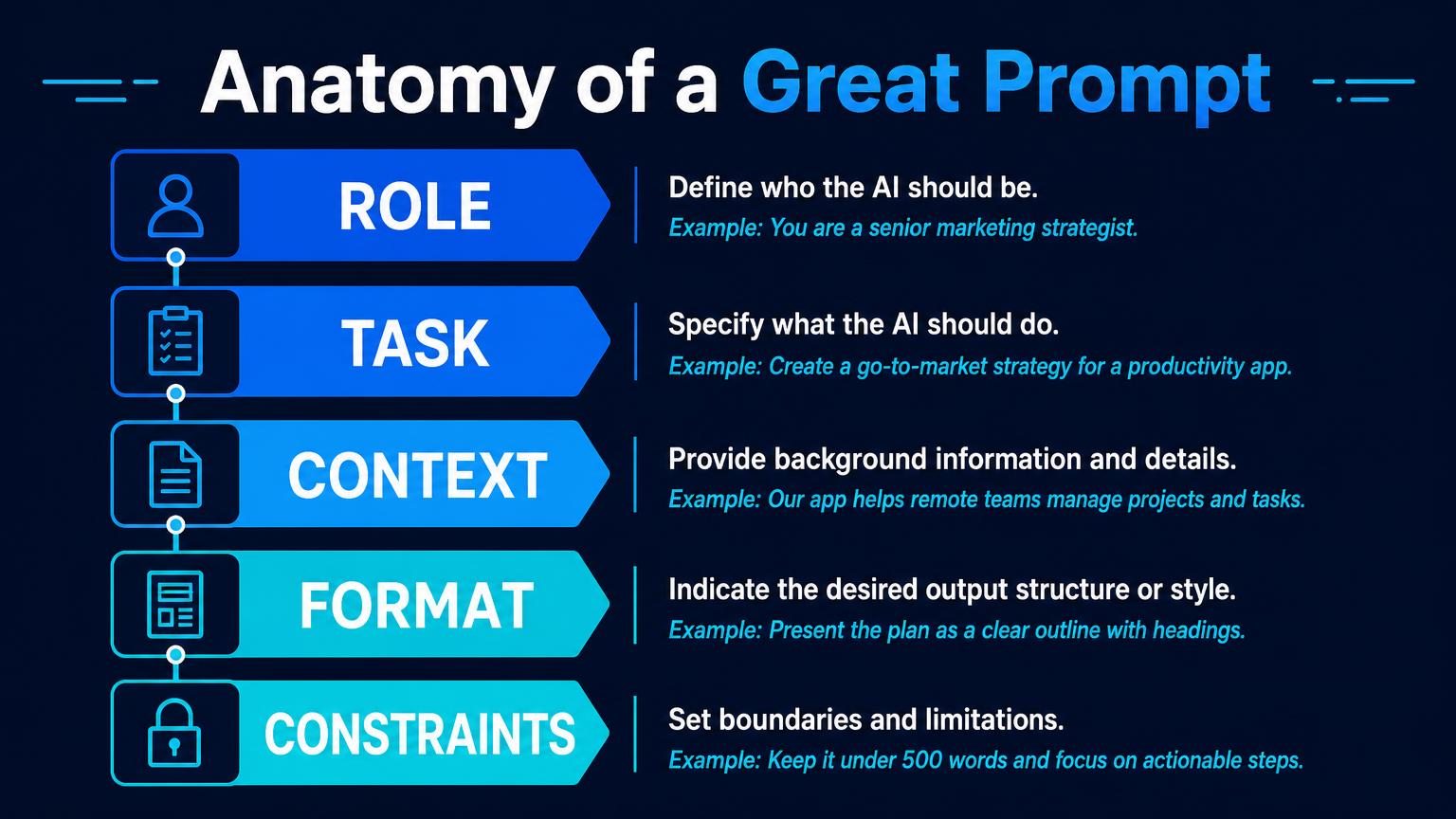
The Anatomy of a Good Prompt
Almost every strong prompt contains the same five ingredients. Learn these and you can stop collecting prompt lists, because you will be able to write your own for any task.
1. Role
Tell the model who it is. A senior performance marketer answers differently from a generic assistant, because the role narrows the vocabulary, priorities and assumptions it draws on.
Example: You are a senior B2B performance marketer with 10 years of paid social experience.
2. Task
State one clear job in one sentence. Multiple tasks in one prompt is the single most common reason output comes back vague.
Example: Write 5 Meta ad headlines for our AI course launch.
3. Context
Give the background the model cannot guess: audience, product, tone, prior attempts, the numbers. This is where most of the quality gain lives.
Example: Audience: non-technical marketers, aged 28 to 45, sceptical of AI hype. Price is 60 EUR per chapter.
4. Format
Describe the shape of the answer, not just the content. Table, bullet list, 3 options, 40 words maximum, plain text with no headings.
Example: Return a numbered list of 5 headlines, each under 40 characters, with no emojis.
5. Constraints
Say what to avoid and what counts as done. Constraints are how you stop the confident filler that makes AI output feel generic.
Example: No superlatives, no invented statistics, do not mention competitors by name.
Before and After: a Real Example
Here is the same request written badly and then written properly.
Before
Write me some ads for my AI course.
The model has no audience, no price, no tone, no format and no limits, so it invents all five. The output looks fine and converts nothing.
After
You are a senior B2B performance marketer with 10 years of paid social experience. Write 5 Meta ad headlines for an applied AI course aimed at non-technical marketers aged 28 to 45 who are sceptical of AI hype. The course teaches ChatGPT, Claude, Canva and CapCut workflows, costs 60 EUR per chapter, and every account gets 3 free minutes per chapter each month. Return a numbered list, each headline under 40 characters, no emojis, no superlatives, no invented statistics. After the list, name the single strongest headline and say why in one sentence.
Same model, same seconds, entirely different output. The difference is not talent, it is the four extra lines of context. If you want the longer version of this with 10 copy-paste prompts, read how to use ChatGPT effectively.
The Write, Test, Refine, Save Loop
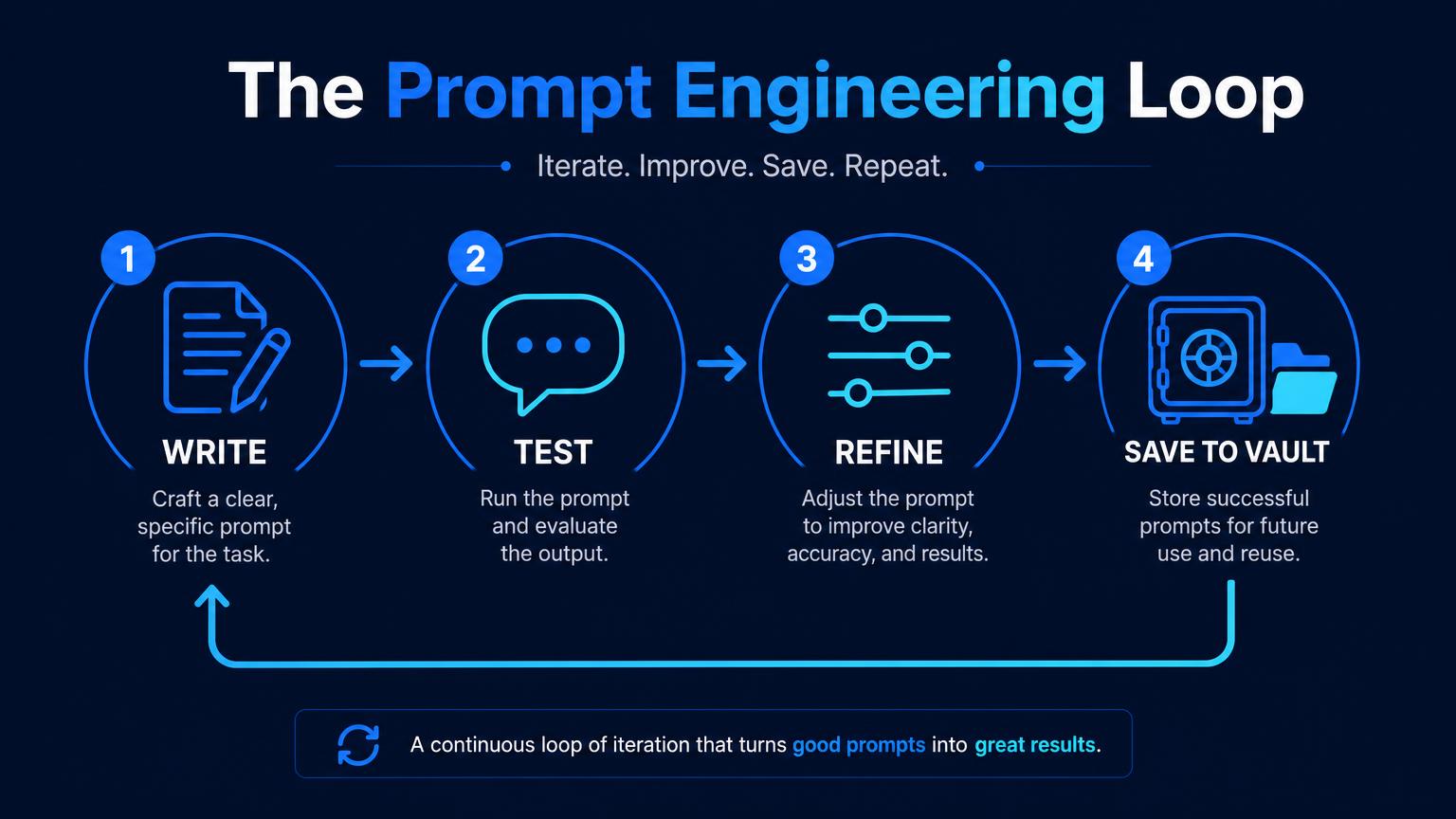
- Write | draft the prompt with all five parts, even if it feels long. Long and specific beats short and vague.
- Test | run it on a real task, not a made-up one. You cannot judge output you do not care about.
- Refine | change one thing at a time. Usually the fix is more context or a tighter constraint, not a new adjective.
- Save | the moment a prompt produces something you would actually use, store it as a template with placeholders.
People who skip step four rebuild the same brief twenty times and never get faster. People who do step four have a personal library within a month and get strong output in seconds.
6 Techniques Worth Knowing
Zero-shot
Just ask, with a good role, task, context, format and constraints. Fine for most everyday work with a modern model.
Few-shot
Paste 2 or 3 examples of the output you want before asking. The fastest way to lock in a tone of voice or a formatting pattern.
Chain of thought
Ask the model to work through the reasoning step by step before giving the answer. Useful for analysis, pricing, planning and anything with intermediate logic.
Role and persona priming
Set expertise, audience and stance up front. Cheap to do, and it changes the entire register of the reply.
Context stuffing
Give the model your real material: the brief, the transcript, the data, the brand guide. Grounded output beats clever phrasing every time.
Self-critique
Ask for the answer, then ask the model to find the three weakest points in its own answer and fix them. Two prompts, noticeably better result.
You do not need all six on day one. Zero-shot plus context stuffing covers most real work, and few-shot handles tone. Add the rest as your tasks get harder.
Where to Keep Your Prompts
Chat history is not storage. It is a scroll-back you will never search successfully, it is tied to one tool, and it disappears the moment you switch models. If prompt engineering is the skill, your prompt library is the asset it produces.
The tool we recommend to every learner is AIQuickPrompt, a dedicated prompt vault. It gives you folders, instant search, one-tap copy and cloud sync across every device, so the prompt you perfected on your laptop is on your phone thirty seconds later, whether you are working in ChatGPT, Claude, Gemini, Perplexity or a local model.
- Create a free account. No card required, and the free plan is genuinely usable for a starter library.
- Play the gamified challenges. AIQuickPrompt rewards the habits that make you better, and completing them can earn you a free month of membership, so building your library actually pays you back.
- Lock the sensitive ones. Client briefs, pricing logic and internal data belong behind the vault's lock, not in a chat log.
- We teach it inside the lessons. Our chapters show you exactly how to structure folders, name templates and version prompts in AIQuickPrompt as part of your weekly workflow, not as an afterthought.
More on the why in why every LLM user needs a prompt vault, and the tool walkthrough in why we recommend AIQuickPrompt to every student.
7 Mistakes Beginners Make
- Asking for five things at once. One task per prompt, then chain them.
- Withholding context. The model is not being coy, it genuinely does not know your business.
- Accepting the first answer. The first output is a draft. The second and third are where the value is.
- Never specifying format. If you do not say table, you get paragraphs.
- Trusting facts without checking. Verify names, numbers, quotes and links every single time.
- Collecting prompts instead of writing them. A downloaded pack of 500 prompts teaches you nothing about your own tasks.
- Not saving what works. See the loop above. This is the expensive one.
Is Prompt Engineering a Career?
It is less often a job title in 2026 and more often a required skill inside existing jobs. The standalone "prompt engineer" roles that made headlines have largely folded into marketing, support, operations and product positions where AI fluency is simply expected. That is good news for non-technical people: you do not need to change career to benefit, you need to become the person on the team whose AI output is reliable.
If you are weighing up how exposed your role is, we mapped that in which careers are safe from AI, and the wider skill picture is in how to learn AI in 2026.
How We Teach It
Market Me Global teaches prompting as a habit rather than a topic. No coding, no theory detours, short chapters built on the tasks you already have:
- Chapter 1 | Best AI Tools for Beginners | the five-part prompt structure, verification, and your first real outputs.
- Chapter 2 | Using AI to Increase Productivity | turning proven prompts into repeatable weekly workflows and a vault you maintain.
- Chapter 3 | AI for Social Media, Captions and Posts | ultra prompts, templates and advanced multi-step builds.
Every account gets 3 free minutes of each chapter every month, no card required, and you can top up whenever you want more. Pair it with a free AIQuickPrompt account and you have both halves: the skill and the library it fills.
Frequently Asked Questions
What is prompt engineering?
Prompt engineering is the practice of writing, testing and refining the instructions you give an AI model so it produces reliable, useful output. In plain English, it is the skill of briefing a model the way you would brief a very capable new colleague: who they are, what you need, the background they are missing, the format you want it in and the limits they must respect.
What is prompt engineering in AI?
In AI, a prompt is the text, image or file input you send to a model such as ChatGPT, Claude or Gemini. Prompt engineering is the discipline of shaping that input, and often a sequence of inputs, so the model's output matches your intent. It covers instruction design, giving examples, breaking work into steps, supplying context and verifying what comes back.
What does a prompt engineer do?
A prompt engineer designs and maintains the prompts behind an AI feature or workflow. Day to day that means writing prompt templates, testing them against real inputs, measuring failure cases, adding guardrails and constraints, versioning what works and documenting it for the rest of the team. In most companies this is now part of a marketing, support or product role rather than a standalone job title.
How do I become a prompt engineer?
Start applied, not academic. Learn the 5-part prompt structure, practise it on your own real tasks for two weeks, save every prompt that works into a prompt vault, and build a small portfolio of before-and-after examples showing time saved or quality gained. Formal courses help with structure, but hiring conversations always come back to what you have produced and how you verified it.
Is prompt engineering still relevant in 2026?
Yes, but it has changed. Models handle sloppy phrasing far better than they did in 2023, so the tricks and magic words matter less. What matters more is context engineering: giving the model the right background, the right files, the right constraints and a clear definition of done, then checking the output. That part is not going away.
Do I need to code to learn prompt engineering?
No. Everything in this guide is plain writing. Coding only becomes relevant if you want to call models through an API and build prompts into software, which is a separate developer skill on top of the same fundamentals.
What is the difference between a prompt and a prompt template?
A prompt is one message you send once. A prompt template is a reusable version of a prompt that worked, with the changing parts marked as placeholders you fill in each time. Templates are where the compounding is: the tenth time you run a proven template, you get a strong result in seconds instead of rebuilding the brief from memory.
Where should I store my prompts?
Anywhere you will actually find them again, which rules out chat history. A dedicated prompt vault such as AIQuickPrompt is the cleanest option: folders, search, cloud sync across devices and a lock for the sensitive ones. A free account is enough to start, and it keeps your best prompts as an asset you own rather than something buried in a scroll-back.
Key Takeaways
- Prompt engineering is briefing a model well, then testing and refining what comes back. No code required.
- Five parts cover almost every prompt: role, task, context, format, constraints.
- In 2026, context beats clever wording. Give the model your real material.
- Save every prompt that works. A vault such as AIQuickPrompt turns one good result into a permanent asset, and its free account plus gamified challenges can earn you a free month.
- The skill is now expected inside normal jobs rather than reserved for a specialist title.