
AI Education · Roadmap
How to Learn AI in 2026: A Practical Roadmap for Non-Technical Beginners
July 22, 2026 · 10 min read · by Emmanuel Abou Chabke
If you are searching for how to learn AI in 2026, you don't need a computer-science degree, a Python bootcamp, or a 40-hour course. You need a roadmap that turns ChatGPT, Claude, Canva and CapCut into a real weekly workflow, and enough discipline to ship one task a week with AI end-to-end. This guide walks you through exactly that: a four-week plan, the tools that matter, the traps to avoid, and how to do most of it for free.
Quick Answer
The fastest way to learn AI in 2026 is to pick one general-purpose model (ChatGPT or Claude), use it every day for a real work task, and add a creative tool (Canva or CapCut) and a research tool over the next four weeks. If you want a compressed shortcut with a prompt pack and a certificate, take Chapter 1: Best AI Tools for Beginners. You can preview it free (3 minutes per chapter every month) before deciding.
Get the Mindset Right First
Most people who fail to learn AI don't fail because it's hard, they fail because they treat it like a new app to memorise. AI in 2026 is not one app. It's a way of working. Two mindset shifts unlock everything:
- Learn by shipping, not by watching. Every hour of tutorials without a real output is wasted. Pick a task you already do at work and finish it with AI.
- Treat AI as a junior teammate, not a magic box. Brief it clearly. Check its work. Iterate. That's the loop.
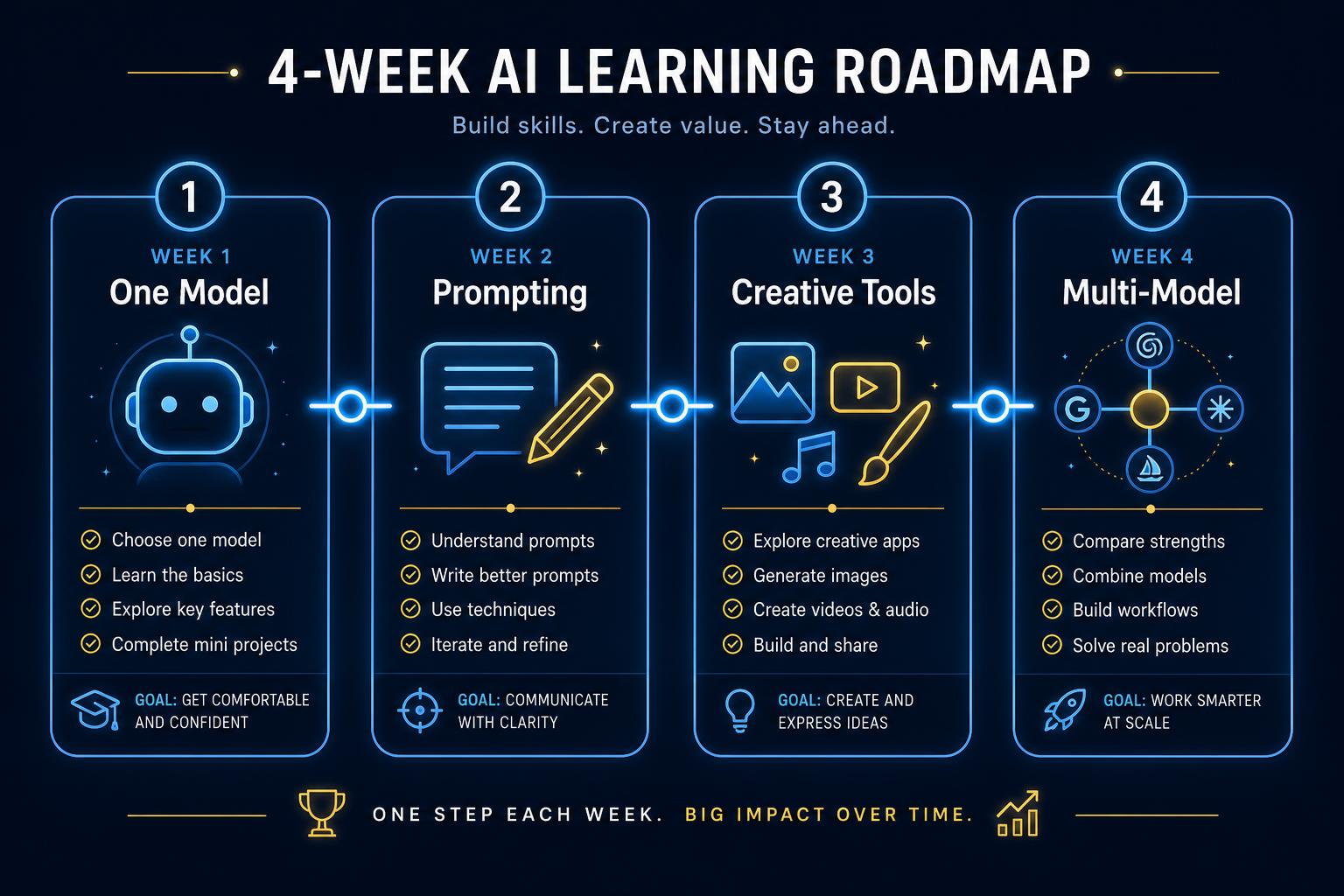
The 4-Week Roadmap
This is the exact sequence we recommend for non-technical beginners. Each week should cost you 2–3 hours, spread across small daily sessions.
Week 1 | One model, one real task
- Pick ChatGPT or Claude. Use only one this week.
- Choose one recurring task at work: a weekly report, a client email, a product description.
- Complete it with AI four days in a row. Notice what you have to explain each time, that's your prompt template.
Week 2 | Prompting and verification
- Learn the basics of a good prompt: role, goal, context, format, constraints, examples.
- Practice verification: never publish anything without checking dates, names and numbers against a second source.
- Start a personal prompt file. Save the 5–10 prompts you reuse most.
Week 3 | Add a creative tool
- Pick Canva Magic Studio if you make images, decks or social posts.
- Pick CapCut AI if you make short-form video.
- Ship one visual asset or one 30-second video using only AI features inside the tool.
Week 4 | Multi-model and research
- Add the second model (whichever you didn't pick in week 1). Notice where it beats the first.
- Add a research tool for fresher information, Perplexity, Google's AI mode, or Claude with web search.
- Complete one full workflow end-to-end: research → brief → draft → visual → publish.
At the end of four weeks you will have done more real AI work than 90% of people who "took an AI course", because you shipped every week.
The Tools That Actually Matter
A modern beginner stack in 2026 has five slots. Fill them in this order:
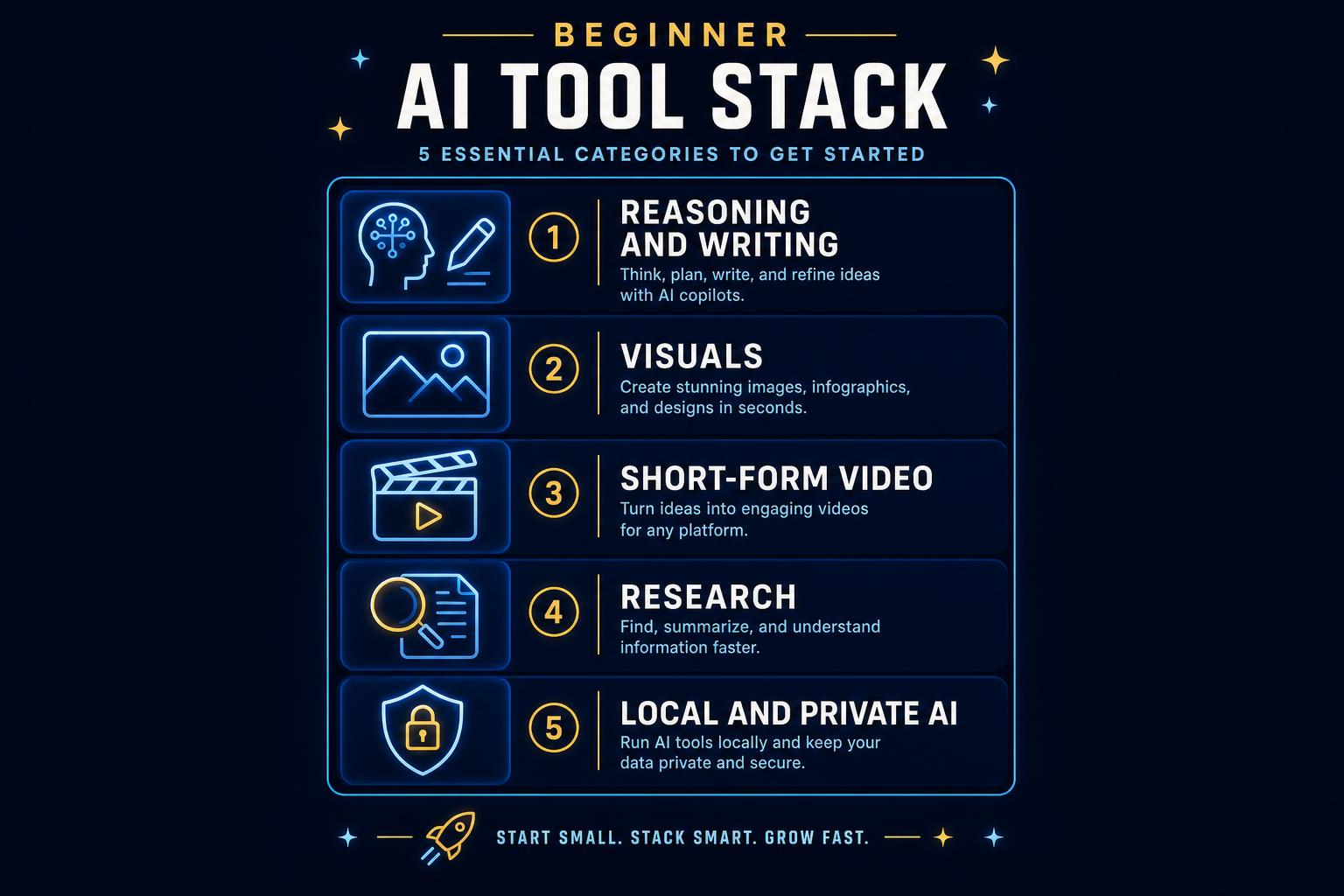
- Reasoning & writing: ChatGPT and Claude.
- Visuals: Canva Magic Studio.
- Short-form video: CapCut AI.
- Research: Perplexity or Claude with web search.
- Private / local: a local LLM on an NPU laptop for sensitive work (optional but powerful).
Everything else, image generators, coding assistants, custom GPTs, is a bonus once these five slots are filled. Read our best AI marketing tools guide for a deeper comparison.
How to Learn AI for Free
You can go a long way without paying anything:
- Free tiers on ChatGPT, Claude and Gemini cover almost every beginner task.
- Free intro courses from Google, Microsoft, IBM and Coursera cover the vocabulary.
- Free 3 minutes per chapter every month inside Market Me Global, no card required.
- YouTube channels for tool-specific tricks, but skim, don't binge.
Free is great for the first two weeks. The limit shows up when you want a system, reusable prompts, a checklist, a portal that tracks progress, a certificate. That's when a paid course pays for itself.
When a Paid Course Is Worth It
Pay for a course when it saves you weeks of trial and error. Specifically when it includes:
- A reusable prompt pack for real work (ads, briefs, funnels, emails).
- Workflow videos you can copy step-by-step.
- A private portal with progress tracking and notes.
- A shareable certificate on completion.
- A real free preview so you can feel the pacing before you buy.
If you're weighing options, our companion post on the best AI course for beginners in 2026 walks through the full buyer's checklist.
Common Mistakes to Avoid
- Watching without shipping. Tutorials feel productive but don't build skill. Ship every week.
- Sticking to one model forever. ChatGPT and Claude have different strengths, a serious user uses both.
- Skipping verification. AI still hallucinates. Every published output needs a second source.
- Buying a 20-hour "mega course". Length is padding. You want workflows, not lectures.
- Ignoring creative tools. Canva and CapCut AI are where most of the visible time-savings hide.
Shortcut the 4 weeks
Chapter 1 compresses this roadmap into a single, workflow-first course with a prompt pack and a certificate.
Our Recommendation
If you have four weeks and discipline, the roadmap above is enough. If you want to compress it into a single weekend with a proven system, take Chapter 1 | Best AI Tools for Beginners. It matches the roadmap step for step:
- ChatGPT and Claude taught side by side with a switching heuristic.
- Prompting and verification frameworks you can reuse forever.
- Canva Magic Studio and CapCut AI for visuals and short-form video.
- AI research tools and (optional) local AI for privacy-sensitive work.
- A reusable prompt pack, private portal, progress tracking and certificate.
- 3 free minutes per chapter every month, preview before you pay.
When you're ready to scale content and creative production, Chapter 2 is the natural next step. The Bundle gives you both for €99 during the early-bird period.
Frequently Asked Questions
How do I start learning AI as a beginner?
Pick one model (ChatGPT or Claude), use it daily for a real work task for a week, then add a creative tool and a research tool over the next three weeks.
Can I learn AI for free?
Yes. Free tiers on ChatGPT, Claude and Gemini plus free intro courses from Google, Microsoft and Coursera cover the basics. Market Me Global also gives 3 free minutes per chapter every month.
Do I need coding to learn AI?
No. Prompting, verification and workflow design are the skills that matter for non-technical users in 2026.
How long does it take to learn AI?
You can be productive in a weekend and confident in about four weeks of consistent daily use.
Should I learn ChatGPT or Claude first?
Either works. Serious users learn both because they behave differently, a good beginner course teaches when to switch.
What's the best way to learn AI in 2026?
Learn by shipping. Complete one real task per week end-to-end with AI. A short workflow-based course accelerates the loop.
Key Takeaways
- Learning AI in 2026 is about workflows, not features.
- Four weeks of daily use beats forty hours of tutorials.
- Fill five tool slots: reasoning, visuals, video, research, and (optional) local AI.
- Free tiers get you 80% of the way; a paid course closes the loop with prompts, portal and certificate.
- Chapter 1 is our compressed shortcut, try 3 free minutes before you buy.
Ready to start? Create a free account or view Chapter 1.
Keep a learning log that records corrections
A useful learning log captures the task, the input, the prompt and the mistake you corrected. This makes progress visible even when a first draft looks impressive. Build from simple rewriting to structured tasks with several constraints. Spend time evaluating output as well as generating it, so you learn what good work looks like in the area you care about.
Try this example
Choose a fictional product and write a short description from a fact sheet. Check for invented benefits and missing details. Revise the prompt, then try a second product without copying the first answer. If you can explain why the second result is better, you are building a transferable skill.
Check your result before the next step
- Practise with inputs you are allowed to share.
- Keep the source facts beside the answer while reviewing.
- Repeat a similar task independently before adding more tools.
One more question, answered
How do I know I am making progress learning AI?
You can define the task more clearly, spot errors faster and repeat a useful workflow with less help. The number of tools you have tried is a weaker measure.
Continue with the beginner AI chapter to put this guide into practice.