
AI Video · Practical workflow
How to Make AI Videos: A Practical 7-Step Workflow
19 September 2026 · 10 min read · by Emmanuel Abou Chabke
A good AI video does not begin with a generator. It begins with a useful message, a controlled plan and a reason for every shot. This guide shows how to move from idea to a finished short video without wasting time or credits.
How Do You Make an AI Video?
Define the audience and one useful outcome. Turn that into a brief, script and shot list. Create a small number of controlled tests, assemble the strongest material with audio and captions, check continuity and rights, then publish in the correct format. The creative tool is only one part of that process.
The production rule
Create the minimum material needed to prove the idea. A short, coherent sequence is more useful than dozens of unrelated clips.
A Seven-Step AI Video Workflow
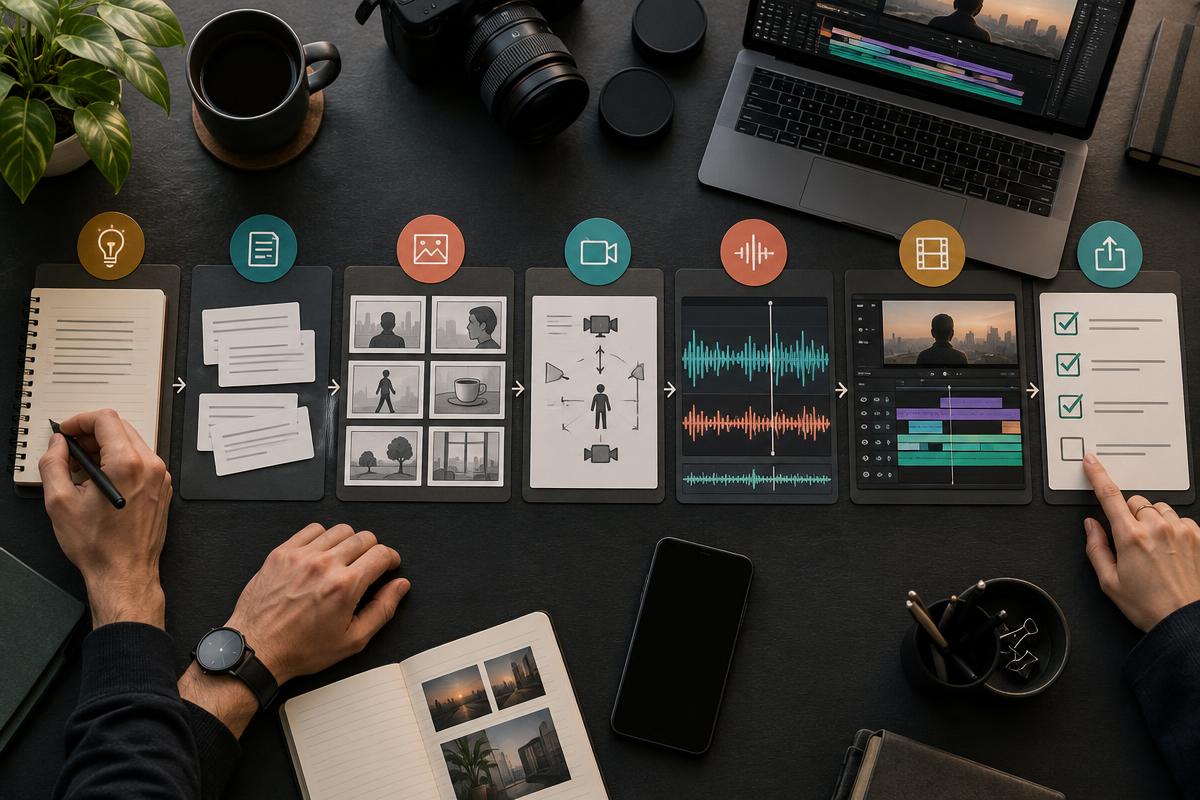
- Step 1
Choose one useful outcome
Define the audience, message, format and one action the viewer should take before creating any footage.
- Step 2
Write a production brief
Set the duration, visual style, required source material, claims, rights and practical limits for the project.
- Step 3
Build the script and shot plan
Break the message into a hook, useful middle and clear ending, then give every line a purposeful visual.
- Step 4
Create controlled tests
Test a small number of shots first, using the same visual references and review criteria instead of generating at random.
- Step 5
Assemble picture and sound
Select the strongest material, record or generate approved narration, add captions and build a clear sequence.
- Step 6
Run quality and rights checks
Review continuity, pacing, audio, claims, accessibility, permissions and any disclosure the final video needs.
- Step 7
Publish, measure and learn
Release the video in the correct format, judge it against its original goal and record improvements for the next cycle.
Three Useful Short-Video Formats to Practise
A 15-second product ad
Lead with the product and one real benefit. Use accurate product material for anything a customer may rely on, then use generated atmosphere only where it supports rather than misrepresents the offer. End with one clear action.
A 30-second presenter video
Give the presenter one message, not an entire article. Use a direct opening, concise explanation and relevant visual cutaways. Check lip movement, voice, captions and any synthetic-person disclosure before release.
A 45-second faceless explainer
Let the narration carry a clear teaching point while each visual demonstrates, compares or clarifies what is being said. A sequence of attractive but unrelated images is not an explanation.
How to Improve Consistency, Quality and Trust
- Lock the reference. Keep the same character, product, palette, framing logic and essential details across shots.
- Describe movement precisely. State what moves, how fast it moves and what the camera does.
- Design the sound. Clean narration, controlled music and intentional silence can rescue an otherwise flat sequence.
- Review the edit as a viewer. Check whether the hook is clear, the middle earns attention and the ending follows naturally.
- Protect trust. Verify claims, permissions, licences and disclosure duties before publishing.
Free starting routes can help you practise, but free credits and commercial terms change. A production budget should count tests, revisions, exports and the time needed to check the result, not only the cost of the first generated clip.
A Complete Practice System in One Fillable PDF
The AI Video Creator Playbook turns this workflow into a guided 58-page practice system. It includes three worked teaching projects, 30 adaptable prompts, five fillable worksheets, troubleshooting guidance, publishing checks and a seven-session plan. The complete tool directory and selection guidance stay inside the paid playbook.
Plan, Create, Edit and Publish With One Repeatable Workflow
Get the 58-page fillable playbook for €9.99 during the first 10 completed purchases, then €19.99 one-time.
Software, subscriptions, credits, footage and editable project files are separate. No campaign result is guaranteed.
Where the Academy Lessons Fit
Chapter 1 builds prompting and research foundations. Chapter 2applies AI to productive creative workflows. Chapter 3 covers social content, digital presenters and video ads. Compare the full route on the AI marketing course page.
Frequently Asked Questions About Making AI Videos
How do I make an AI video?
Start with one audience and outcome, write a short brief and script, plan the shots, create a few controlled visual tests, assemble the strongest material with sound and captions, review quality and rights, then publish and learn from the result.
Can I make AI videos for free?
You can begin with free starting routes and limited credits, but availability and commercial-use terms can change. Plan the video before generating so scarce credits are spent on purposeful tests rather than random attempts.
What makes a good AI video prompt?
A useful prompt describes the subject, action, setting, framing, camera movement, lighting, mood and continuity requirements. It should also say what must remain unchanged and what the shot needs to achieve in the final edit.
How do I keep AI video shots consistent?
Use the same character and product references, repeat essential visual details, limit unnecessary changes and compare every test against one approved reference frame. Continuity is easier when the shot list is planned before generation.
How do I make a faceless AI video?
Build it around one helpful explanation, a concise narration, purposeful supporting visuals, readable captions and a clear takeaway. The visuals should explain or prove the narration rather than simply decorate it.
Can AI create a product advert?
AI can support concept shots, backgrounds, scripts, narration and editing, but accurate product material and honest claims should stay central. Never present generated features or results as real product evidence.
Do AI videos need captions?
Captions make short videos easier to follow without sound and improve accessibility. Keep them accurate, readable, timed to the spoken words and clear of interface elements that may cover them on social platforms.
Do I need to disclose AI-generated video?
Disclosure depends on the content, platform and jurisdiction. Synthetic people, realistic altered events, endorsements and public-interest content may need special care. Check current platform rules and local requirements before publishing.
What is included in the AI Video Creator Playbook?
It is a 58-page fillable PDF with three worked short-video projects, 30 adaptable prompts, five production worksheets, troubleshooting guidance, publishing checks and a seven-session practice plan.
Which projects does the playbook cover?
The worked teaching projects cover a 15-second product ad, a 30-second presenter video and a 45-second faceless explainer. They are instructional examples, not reports of measured campaign performance.
Before you publish
Watch the finished video once without sound, once with your eyes away from the screen and once as a sceptical customer. Fix anything that becomes unclear, misleading or difficult to follow.
About the author
Emmanuel Abou Chabke is the founder of Market Me Global and the instructor behind Market Me Global Academy. He teaches practical AI workflows for marketers, creators and small businesses.